
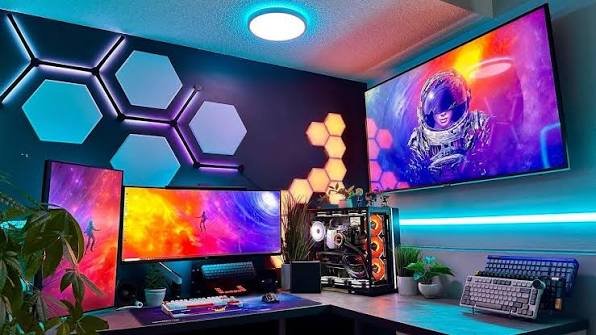
A good gaming setup is more than just a powerful computer and an expensive monitor. It is a personal space where performance, comfort, style, and entertainment come together. Whether you are a casual gamer, a competitive player, or someone who enjoys streaming games online, the right gaming setup can make your experience much more enjoyable.
Building the perfect setup does not necessarily mean spending thousands of dollars. With the right planning, you can create a comfortable and attractive gaming space on almost any budget. The key is to choose equipment that matches your gaming needs and arrange everything in a way that keeps you comfortable during long sessions.
What Is a Gaming Setup?
A gaming setup is the complete collection of equipment, furniture, accessories, and technology used for playing video games. It can include a gaming PC or console, monitor or television, gaming keyboard and mouse, headset, speakers, gaming chair, desk, lighting, and other accessories.
Every gamer has different preferences. Some people prefer a powerful PC with multiple monitors, while others want a simple console setup with a large TV. Your ideal gaming setup depends on the games you play, the amount of space available, and your budget.
The most important thing is to create a setup that works well for you rather than simply copying someone else’s room.
Choose the Right Gaming PC or Console
The first major decision is choosing your gaming platform. If you prefer PC gaming, you need a computer with suitable hardware for the games you want to play. A capable processor, graphics card, sufficient RAM, and fast storage can make a significant difference in gaming performance.
For PC gaming, the graphics card is particularly important because it handles much of the visual processing. If you enjoy modern games at high resolutions and high frame rates, investing in a stronger graphics card can be worthwhile.
Console gamers have a simpler approach. Modern consoles provide excellent gaming performance without requiring users to build or upgrade a computer. They can also be connected to a large television for a more immersive experience.
Before buying anything, consider the games you normally play. There is little reason to spend a huge amount on hardware if you mostly play lightweight or older games.
Select a Good Gaming Monitor
A monitor is one of the most important parts of a PC gaming setup. A beautiful computer will not feel complete if your display has poor image quality or noticeable input delay.
When choosing a gaming monitor, pay attention to screen size, resolution, refresh rate, response time, and panel quality. A higher refresh rate can make fast-paced games feel smoother, especially when your computer can produce enough frames per second.
Resolution is another important consideration. A 1080p monitor can be an excellent choice for budget gaming, while 1440p offers a good balance between image quality and performance. Gamers with powerful hardware may prefer 4K for sharper visuals.
You should also think about desk space. A large monitor can look impressive, but it should not dominate your entire workspace.
Invest in a Comfortable Gaming Chair
Comfort is often overlooked when people build a gaming setup. However, if you regularly spend several hours gaming, a comfortable chair can be one of the best investments you make.
Look for a chair that provides proper support for your back and encourages good posture. Adjustable height, armrests, and back support can make it easier to find a comfortable sitting position.
You do not necessarily need an expensive chair marketed specifically for gamers. A high-quality ergonomic office chair can work just as well, and sometimes even better.
Remember that the goal is comfort and support, not simply having a chair with a flashy design.
Pick the Right Gaming Desk
Your desk should provide enough room for your monitor, keyboard, mouse, and other accessories. If you use multiple monitors or keep additional equipment nearby, you will need more workspace.
A desk with cable-management features can also make your gaming setup look much cleaner. Built-in cable holes, trays, and compartments can help keep wires organized.
The height of the desk matters as well. Your arms should rest comfortably while using the keyboard and mouse, and your monitor should be positioned at a suitable viewing height.
A clean desk does not only look better; it can also make your gaming area feel less distracting.
Don’t Ignore the Keyboard and Mouse
For PC gamers, the keyboard and mouse are essential. Your choice should depend on the types of games you play and your personal preferences.
Mechanical keyboards are popular because they provide tactile feedback and are available with different types of switches. Some gamers prefer quieter switches, while others enjoy a more noticeable click or tactile response.
When choosing a gaming mouse, consider its shape, weight, sensor performance, and button placement. A mouse that feels comfortable in your hand can be more valuable than one with unnecessary features.
Competitive gamers may care more about weight and responsiveness, while casual gamers might prioritize comfort and affordability.
Get a Reliable Gaming Headset
Audio can dramatically improve the gaming experience. A good gaming headset allows you to hear important sounds such as footsteps, environmental effects, and dialogue.
If you play multiplayer games, a clear microphone is also important because communication with teammates can affect the outcome of a match.
Look for a headset that feels comfortable over long periods. Lightweight construction, soft ear cushions, and adjustable headbands can reduce discomfort.
Wireless headsets can provide a cleaner desk because they eliminate another cable, while wired models are often simpler and do not require battery charging.
Add Proper Lighting
Lighting can transform an ordinary gaming area into an attractive gaming setup. RGB lighting is particularly popular because it allows gamers to customize the colors and atmosphere of their space.
You can add LED strips behind your desk or monitor, use RGB accessories, or install smart lights around the room. However, lighting does not need to be complicated.
Avoid extremely bright lights shining directly into your eyes or onto your monitor. Soft ambient lighting is generally more comfortable, especially during nighttime gaming sessions.
Good lighting should improve the atmosphere without making it difficult to see your screen.
Keep Your Cables Organized
Cable management is one of the easiest ways to make a gaming setup look more professional. A desk covered with tangled cables can quickly make even expensive equipment look messy.
Start by identifying each cable and deciding where it should go. Use cable clips, sleeves, ties, or an under-desk cable tray to keep everything organized.
Try to separate power cables from other cables where practical and leave enough slack so you can move your equipment without pulling on the connections.
A few minutes spent organizing cables can make a surprisingly big difference.
Add Personal Touches
Your gaming setup should reflect your personality. After choosing the essential equipment, you can add decorative elements that make the space feel like your own.
Posters, collectibles, wall art, plants, shelves, figurines, and themed accessories can all add character. You can also choose a color theme and match your lighting, desk accessories, and decorations.
However, avoid overcrowding the space. Too many decorations can make the area feel distracting and difficult to maintain.
A balanced setup usually looks cleaner and feels more comfortable.
Consider Ergonomics
Gaming for long periods can put stress on your neck, back, wrists, and eyes. That is why ergonomics should be part of your gaming setup from the beginning.
Keep your monitor at a comfortable height so you do not constantly bend your neck. Your keyboard and mouse should be positioned so your wrists remain in a natural position.
It is also a good idea to take regular breaks. Stand up, move around, stretch, and give your eyes a break from the screen.
A gaming setup should help you enjoy your hobby comfortably rather than encourage unhealthy habits.
Build Your Gaming Setup According to Your Budget
You do not need a huge budget to create a great gaming setup. Start with the equipment that has the biggest impact on your gaming experience.
For a limited budget, prioritize a reliable gaming platform, comfortable chair, suitable monitor, and dependable keyboard and mouse. Decorative lighting and additional accessories can always be added later.
With a medium budget, you can consider upgrading your monitor, adding better audio equipment, improving cable management, and adding attractive lighting.
For a high-end setup, you might consider multiple monitors, premium peripherals, a powerful gaming PC, advanced lighting, a larger desk, and dedicated streaming equipment.
The most expensive setup is not automatically the best one. The best gaming setup is the one that provides the performance, comfort, and features you actually need.
Frequently Asked Questions
1. What is the most important part of a gaming setup?
The most important part depends on how you play. For PC gamers, the computer and monitor are usually the biggest priorities. However, comfort is equally important for people who spend long hours gaming, so a good chair and desk should not be ignored.
2. How much does a good gaming setup cost?
A gaming setup can cost anywhere from a few hundred dollars to several thousand dollars. You can create a simple and effective setup on a limited budget by focusing on essential equipment and upgrading individual components over time.
3. Do I need a gaming chair for my setup?
No. A gaming chair is not essential. A comfortable ergonomic office chair can be an excellent alternative. The most important factors are proper support, adjustability, and comfort rather than the chair’s gaming appearance.
4. Is RGB lighting necessary for a gaming setup?
RGB lighting is completely optional. It can make your gaming area look more attractive and create a specific atmosphere, but it does not improve gaming performance. If you have a limited budget, spend your money on essential hardware first.
5. What monitor is best for gaming?
The best monitor depends on your hardware and the games you play. A 1080p monitor can be suitable for budget gaming, while 1440p offers a strong combination of image quality and performance. Gamers with powerful hardware may prefer a 4K display.
6. How can I make my gaming setup look cleaner?
Cable management is one of the easiest improvements. Use cable clips, sleeves, ties, and under-desk trays to organize wires. Keeping your desk free from unnecessary items and using a consistent color theme can also make the setup look cleaner.
7. Can I build a gaming setup in a small room?
Yes. A small room can still have an excellent gaming setup. Choose a compact desk, use wall-mounted shelves where possible, and avoid unnecessary furniture. A single monitor and carefully organized accessories can provide everything you need without taking up much space.
8. How can I make my gaming setup more comfortable?
Focus on ergonomics. Use a supportive chair, position your monitor at a comfortable height, keep your keyboard and mouse at a natural position, and take regular breaks during long gaming sessions. Good lighting can also reduce eye strain and make the space more comfortable.
Final Thoughts
Creating the perfect gaming setup is about finding the right balance between performance, comfort, organization, and personal style. You do not have to purchase every premium accessory at once. Start with the essentials and improve your setup gradually.
A powerful gaming PC or console, quality display, comfortable chair, reliable peripherals, organized cables, and suitable lighting can create an excellent gaming environment.
Most importantly, design the space around your own needs. Whether you have an entire gaming room or just a small corner of your bedroom, thoughtful planning can turn almost any space into an enjoyable gaming setup.