
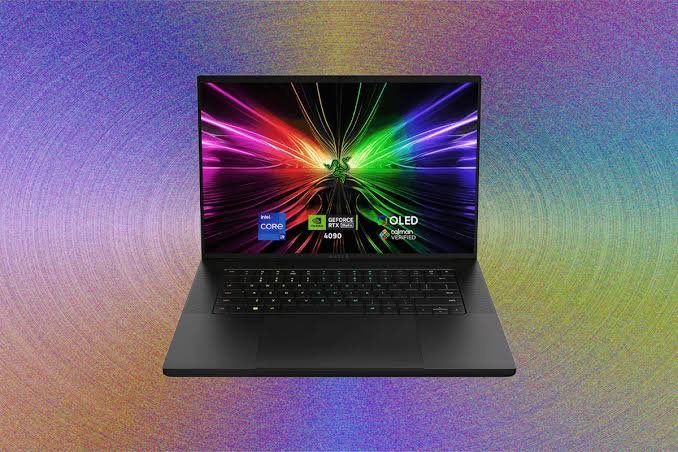
A Gaming Laptop is more than just a portable computer for playing games. Modern gaming laptops combine powerful processors, dedicated graphics cards, fast displays, large storage, and efficient cooling systems to deliver an experience that can compete with many desktop computers. Whether you are a casual gamer, a competitive player, a content creator, or someone who simply wants a powerful everyday laptop, choosing the right gaming laptop can make a significant difference.
With so many models and specifications available, finding the perfect option can feel confusing. Manufacturers offer laptops with different processors, graphics cards, screen sizes, refresh rates, RAM capacities, and storage options. Understanding these features can help you spend your money wisely and choose a machine that matches your actual needs.
What Is a Gaming Laptop?
A gaming laptop is a portable computer designed specifically to handle demanding games and other performance-heavy tasks. Unlike ordinary laptops, gaming models generally include dedicated graphics processing units (GPUs), high-performance CPUs, improved cooling systems, and displays with faster refresh rates.
These features allow a gaming laptop to run modern games at higher settings while maintaining smoother performance. Many models can also handle video editing, 3D rendering, graphic design, programming, streaming, and other demanding workloads.
One of the biggest advantages is portability. A desktop gaming PC may offer excellent performance, but it requires a separate monitor, keyboard, mouse, and power setup. A gaming laptop puts most of these components into one portable device, allowing you to play or work from different locations.
Why Choose a Gaming Laptop?
The main reason people choose a gaming laptop is flexibility. You can use the same machine for gaming, studying, working, entertainment, and creative projects.
For students, a gaming laptop can serve as both a study computer and a gaming machine. Professionals may appreciate the extra processing power for demanding applications. Gamers benefit from dedicated graphics and high-refresh-rate displays.
Another advantage is that many gaming laptops now have relatively subtle designs. While some models still feature aggressive RGB lighting and bold styling, there are plenty of options with clean, professional appearances.
A good gaming laptop can also provide excellent performance without requiring you to build a computer yourself. You simply choose the specifications you need, install your software and games, and start using it.
Important Specifications to Consider
Choosing a gaming laptop becomes much easier when you understand its main components.
Processor
The processor, or CPU, is responsible for handling many of the instructions required by games and applications. A modern multi-core processor can provide strong gaming performance while also helping with multitasking.
When comparing laptops, look for a recent-generation processor rather than focusing only on the number of cores or the maximum clock speed. Newer CPUs often offer better efficiency and improved performance.
If you plan to stream games, edit videos, or run multiple applications simultaneously, investing in a stronger processor can be worthwhile.
Graphics Card
The GPU is arguably the most important component for gaming performance. It processes visual information and determines how smoothly many games can run at different resolutions and quality settings.
A dedicated graphics card is essential for serious gaming. Entry-level GPUs can be suitable for esports and less demanding games, while more powerful GPUs are better for modern AAA titles at higher resolutions and graphical settings.
If gaming is your primary reason for buying the laptop, consider spending more on the GPU rather than paying extra for features that do not significantly improve gaming performance.
RAM
RAM affects how efficiently your laptop can handle games and multiple applications. While 8GB may be enough for basic tasks, 16GB of RAM is generally a much more comfortable choice for modern gaming.
Gamers who stream, edit videos, use demanding creative applications, or keep many programs open at the same time may benefit from 32GB or more.
It is also worth checking whether the laptop allows RAM upgrades. An upgradeable laptop can give you more flexibility in the future.
Storage
Games are becoming increasingly large, so storage capacity matters. A solid-state drive (SSD) offers much faster loading times than traditional hard drives and is now the preferred storage option for gaming laptops.
A 512GB SSD can be enough for a moderate game library, but a 1TB SSD is often a better choice if you regularly install large games.
Some laptops also provide an additional storage slot, allowing you to expand your capacity later.
Display Quality Matters
A powerful GPU is only part of the gaming experience. Your laptop’s display also plays an important role.
Refresh rate is especially important for competitive games. A 60Hz display refreshes the image 60 times per second, while 120Hz, 144Hz, 165Hz, and higher refresh rates can make movement appear significantly smoother.
Resolution is another consideration. Full HD is still a popular choice because it provides a good balance between image quality and performance. Higher-resolution displays can produce sharper visuals, but they also require more GPU power.
You should also consider brightness, color accuracy, response time, and panel quality. If you use your laptop for photo or video editing, a display with good color coverage may be more important than an extremely high refresh rate.
Cooling and Build Quality
Gaming generates more heat than many everyday laptop tasks. Because of this, cooling is extremely important.
Gaming laptops usually include multiple fans, heat pipes, vents, and other thermal solutions to keep the CPU and GPU within safe operating temperatures. A laptop with poor cooling may experience performance reductions when components become too hot.
Before buying, pay attention to the laptop’s cooling design and reviews from reliable sources. A powerful specification list does not necessarily guarantee excellent real-world performance.
Build quality also matters. If you plan to carry your laptop to school, work, or travel regularly, a durable chassis and strong hinges can be valuable.
Battery Life and Portability
Gaming laptops are designed for performance, so their battery life is often shorter than that of thin-and-light laptops. High-performance processors and dedicated GPUs consume considerable power.
When gaming, you will generally get the best performance while connected to the charger. Battery performance is more important for everyday activities such as browsing, writing documents, watching videos, or attending online meetings.
Weight is another factor. Larger gaming laptops may offer better cooling and more powerful hardware, but they can be heavier. Smaller models are easier to carry but may have limitations in cooling or upgradeability.
Think about how often you will actually travel with the laptop before choosing the size.
Gaming Laptop for Different Types of Gamers
Not every gamer needs an expensive high-end machine.
If you mainly play esports titles such as competitive shooters, strategy games, or lighter multiplayer games, a mid-range gaming laptop with a capable GPU and a high-refresh-rate display may be enough.
For players who enjoy modern AAA games, a stronger graphics card, 16GB or more RAM, and a fast SSD are sensible choices.
Enthusiasts who want maximum graphical quality, high resolutions, or demanding ray-tracing features may want a premium model with a high-end GPU and processor.
The best gaming laptop is not necessarily the most expensive one. It is the one that provides the performance you need without paying for specifications you will rarely use.
Can You Use a Gaming Laptop for Work?
Yes. A gaming laptop can be an excellent work computer because its powerful hardware makes everyday tasks feel responsive.
Web browsing, office applications, video conferencing, programming, photo editing, and many professional applications can run comfortably on a capable gaming laptop.
However, some gaming laptops are heavier and have shorter battery life than business-focused machines. Their fans may also become noticeable during demanding workloads.
If you work primarily at a desk and want one computer that can handle both professional tasks and gaming, these disadvantages may be relatively minor.
How to Maintain Your Gaming Laptop
Taking care of your laptop can help maintain its performance over time.
Keep the air vents clear and avoid using the laptop on soft surfaces such as beds or thick blankets. Dust can accumulate inside the cooling system, so periodic cleaning can help airflow.
Keep your operating system, graphics drivers, and important software updated. It is also a good idea to monitor temperatures when running demanding games.
Avoid unnecessary background applications while gaming, especially if your system has limited RAM or processing resources.
Finally, transport your laptop carefully and use a suitable protective bag if you frequently carry it outside your home.
Frequently Asked Questions
1. What is the most important feature in a gaming laptop?
For gaming, the graphics card is one of the most important components because it has a major impact on visual quality and frame rates. However, the CPU, RAM, cooling system, and display also contribute to the overall experience.
2. Is 16GB RAM enough for a gaming laptop?
Yes, 16GB of RAM is generally a good amount for modern gaming. It provides enough memory for most games while allowing you to run other applications in the background.
3. Is a gaming laptop good for everyday use?
Yes. A gaming laptop can easily handle everyday activities such as browsing the web, watching videos, using office software, attending online meetings, and studying. The main drawbacks can be extra weight and shorter battery life.
4. How much storage should a gaming laptop have?
A 512GB SSD can work for users with a small game library, but 1TB is a more comfortable choice for many gamers. Modern games can take up a significant amount of storage, so additional expansion options can also be useful.
5. Are gaming laptops good for students?
Yes. A gaming laptop can be useful for students who need a powerful computer for studying, programming, creative applications, and entertainment. However, students who travel frequently should consider weight and battery life.
6. Can a gaming laptop replace a desktop PC?
For many users, yes. Modern gaming laptops can provide excellent performance in a portable form. However, desktop computers often offer better upgradeability, cooling, and performance at similar prices.
7. Do gaming laptops get hot?
Gaming laptops can become warm or hot during demanding games because the CPU and GPU generate considerable heat. A good cooling system, proper ventilation, and regular cleaning can help manage temperatures.
8. How long can a gaming laptop last?
The lifespan depends on the hardware, build quality, maintenance, and how heavily it is used. A good gaming laptop can remain useful for several years, although newer games may eventually require lower graphical settings as hardware requirements increase.
Final Thoughts
Buying a Gaming Laptop is an investment, so it is worth looking beyond marketing claims and focusing on the specifications that actually affect your experience. The processor, graphics card, RAM, storage, display, cooling system, and build quality all deserve attention.
Before making a purchase, decide what games you play, what resolution you prefer, how much storage you need, and whether you will use the laptop for work or creative tasks. Your budget should then guide the balance between these features.
A well-chosen gaming laptop can provide years of enjoyable gaming while also serving as a powerful computer for school, work, entertainment, and creative projects. Instead of simply choosing the laptop with the biggest numbers, focus on the combination of features that fits your personal requirements.